FCM(Firebase Cloud Messaging)のPush通知を、アプリがフォアグラウンドの状態で取得する方法。
ただし、FlutterのAndroidのみ動作確認済み。また、Push通知タップ時の処理については記載していない。
目次
実装
①pubspec.yamlに以下を追加し、Pub Getする
dev_dependencies:
  flutter_test:
    sdk: flutter
  firebase_core: ^1.3.0
  cloud_firestore: ^2.2.2
  firebase_messaging: ^10.0.2 // add
  flutter_local_notifications: ^6.0.0 // add
②FlutterLocalNotificationsPluginを定義する
final FlutterLocalNotificationsPlugin flutterLocalNotificationsPlugin = FlutterLocalNotificationsPlugin();
③トークンを取得する処理を実装する
これがないとPush通知が届かなかった。
FirebaseMessaging _firebaseMessaging = FirebaseMessaging.instance;

_firebaseMessaging.getToken().then((String token) {
  print("$token");
});
④フォアグラウンドでPush通知を受け取ったときにPush通知を作成&表示する処理を実装する
FirebaseMessaging.onMessage.listen((RemoteMessage message) {
  print("フォアグラウンドでメッセージを受け取りました");
  RemoteNotification notification = message.notification;
  AndroidNotification android = message.notification?.android;
  if (notification != null && android != null) {
    // フォアグラウンドで通知を受け取った場合、通知を作成して表示する
    flutterLocalNotificationsPlugin.show(
        notification.hashCode,
        notification.title,
        notification.body,
        NotificationDetails(
          // 通知channelを設定する
          android: AndroidNotificationDetails(
            'like_channel', // channelId
            'あなたの投稿へのコメント', // channelName
            'あなたの投稿にコメントが来たら通知を受信します。', // channelDescription
            icon: 'launch_background',
          ),
        )
    );
  }
});
(1)バックグラウンドとフォアグラウンドでの挙動について
公式サイトに記載があるが、Push通知を受信したときにアプリがフォアグラウンドにいるかバックグラウンドにいるかで挙動が変わる。
アプリがバックグラウンドにいる場合、通知トレイで通知ペイロードを受け取り、FirebaseMessaging.onMessage.listenで登録した処理は呼ばれない。
アプリがフォアグラウンドにいる場合、FirebaseMessaging.onMessage.listenで登録した処理が走り、そこでPush通知を作成して表示する。
(2)通知channelについて
NotificationDetailsに設定しているは、設定画面でこのように表示される。
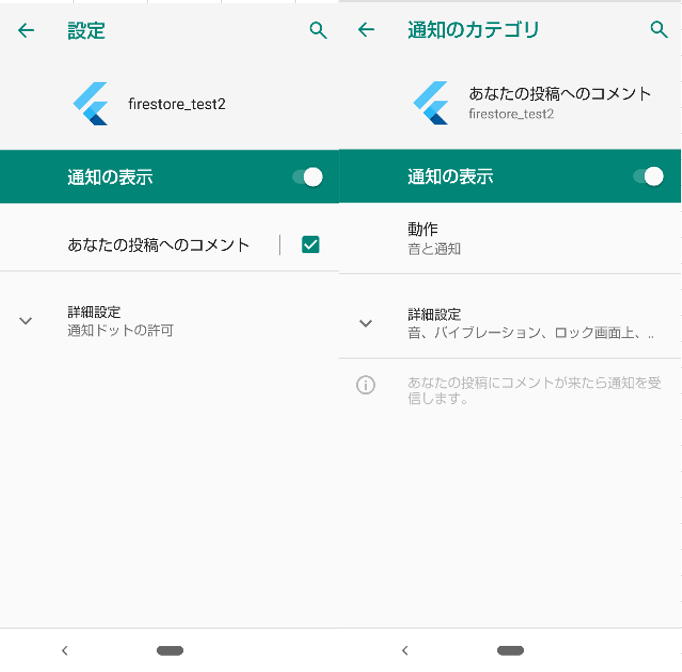
※ビルドだけではこのように表示されず、一度Push通知を受信したら表示される。
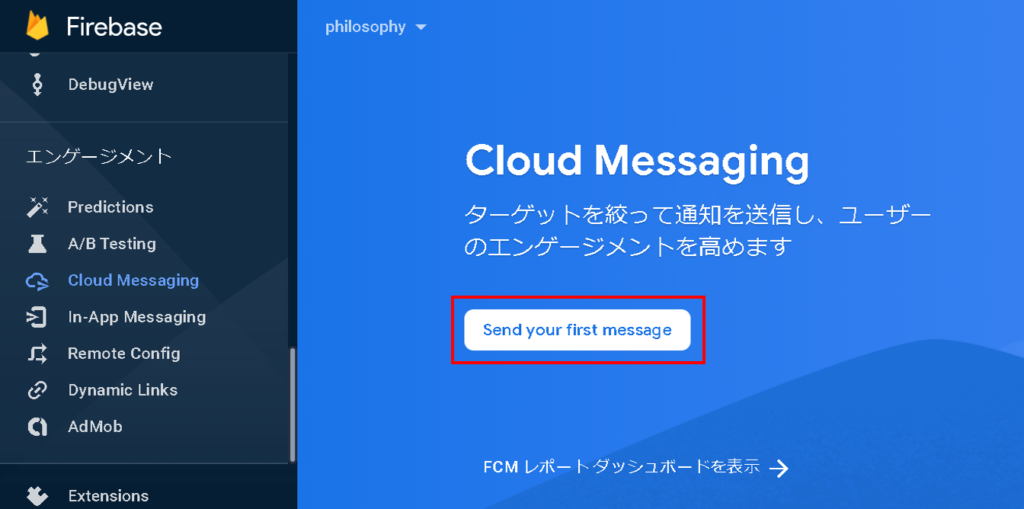
⑤FirebaseコンソールのCloud Messagingを開き、「Send your first message」をクリックして、Push通知を送信する
全文
import 'package:flutter/material.dart';
import 'package:firebase_core/firebase_core.dart';
import 'package:firebase_messaging/firebase_messaging.dart';
import 'package:flutter_local_notifications/flutter_local_notifications.dart';

final FlutterLocalNotificationsPlugin flutterLocalNotificationsPlugin = FlutterLocalNotificationsPlugin();

Future<void> main() async {
  WidgetsFlutterBinding.ensureInitialized();
  // Fireabse初期化
  await Firebase.initializeApp();
  runApp(MyApp());
}

class MyApp extends StatelessWidget {
  @override
  Widget build(BuildContext context) {
    return MaterialApp(
      debugShowCheckedModeBanner: false,
      title: 'Flutter Demo',
      theme: ThemeData(
        primarySwatch: Colors.blue,
        visualDensity: VisualDensity.adaptivePlatformDensity,
      ),
      home: MyFirestorePage(),
    );
  }
}

class MyFirestorePage extends StatefulWidget {
  @override
  _MyFirestorePageState createState() => _MyFirestorePageState();
}

class _MyFirestorePageState extends State<MyFirestorePage> {
  // プッシュ通知用
  FirebaseMessaging _firebaseMessaging = FirebaseMessaging.instance;

  @override
  void initState() {
    super.initState();

    _firebaseMessaging.getToken().then((String token) {
      print("$token");
    });

    FirebaseMessaging.onMessage.listen((RemoteMessage message) {
      print("フォアグラウンドでメッセージを受け取りました");
      RemoteNotification notification = message.notification;
      AndroidNotification android = message.notification?.android;

      if (notification != null && android != null) {
        // フォアグラウンドで通知を受け取った場合、通知を作成して表示する
        flutterLocalNotificationsPlugin.show(
            notification.hashCode,
            notification.title,
            notification.body,
            NotificationDetails(
              // 通知channelを設定する
              android: AndroidNotificationDetails(
                'like_channel', // channelId
                'あなたの投稿へのコメント', // channelName
                'あなたの投稿にコメントが来たら通知を受信します。', // channelDescription
                icon: 'launch_background',
              ),
            )
        );
      }
    });
  }

  @override
  Widget build(BuildContext context) {
    return Scaffold(
      body: Center(
        child: Text("Push通知テスト"),
      )
    );
  }
}
補足
通知Channelを分けたいなどあれば、FCMで送信するdataに値を設定し、dataの値で分岐すればOK。
FirebaseMessaging.onMessage.listen((RemoteMessage message) {
  print("フォアグラウンドでメッセージを受け取りました");
  RemoteNotification notification = message.notification;
  AndroidNotification android = message.notification?.android;
  String type = message.data['type'];
  if (notification != null && android != null && type != null) {
    switch (type) {
      case 'comment':
        flutterLocalNotificationsPlugin.show(
            notification.hashCode,
            notification.title,
            notification.body,
            NotificationDetails(
              // 通知channelを設定する
              android: AndroidNotificationDetails(
                'like_channel', // channelId
                'あなたの投稿へのコメント', // channelName
                'あなたの投稿にコメントが来たら通知を受信します。', // channelDescription
                icon: 'launch_background',
              ),
            )
        );
        break;
      case 'good':
        // 省略
        break;
    }
  }
});
コメントを残す